
Repost: ctrlvee: Extract external R code and insert inline
Want to share your content on R-bloggers? click here if you have a blog, or here if you don't.
Reposted from the original at https://blog.stephenturner.us/p/ctrlvee-extract-external-r-code-insert-inline-positron-rstudio-addin.
Ever find yourself looking through a pkgdown page or a Quarto book, copying and pasting code chunks from your browser into your IDE? I do, and it’s a minor annoyance.1
My friend and colleague VP Nagraj published a new R package called ctrlvee that makes this a lot easier.
It does one thing. Put your cursor anywhere in an R script in Positron or RStudio, call the add-in, provide a URL, and a few milliseconds later you’ll have all the code from that page in your editor, separated by chunk boundaries (along with some metadata and a note to check the license!).
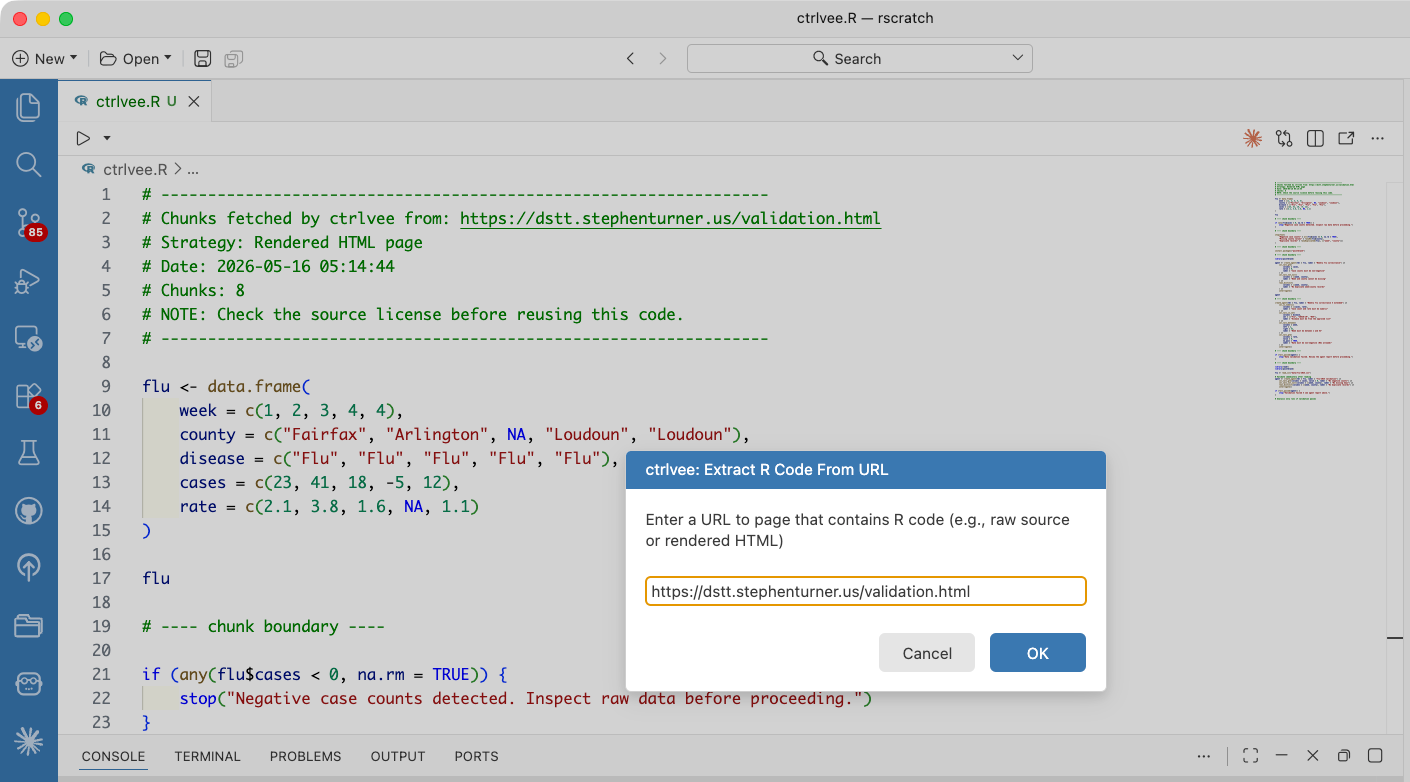
The package README provides a demonstration using the “Data Validation and QA” chapter of my Data Science Team Training book (dstt.stephenturner.us).
Install the package:
install.packages("ctrlvee")Run the add-in. In Positron you’ll open the command palette, search for Run RStudio Addin, then extract external R code and insert inline. You’ll get a modal asking you for a URL.
Paste one in. E.g., https://dstt.stephenturner.us/validation.html
The R code from the website appears in your editor 🚀
Here’s a demo.
Here’s what the extracted/inserted code looks like, from this source.
# -----------------------------------------------------------------
# Chunks fetched by ctrlvee from: https://dstt.stephenturner.us/validation.html
# Strategy: Rendered HTML page
# Date: 2026-05-16 05:14:44
# Chunks: 8
# NOTE: Check the source license before reusing this code.
# -----------------------------------------------------------------

flu <- data.frame(
    week = c(1, 2, 3, 4, 4),
    county = c("Fairfax", "Arlington", NA, "Loudoun", "Loudoun"),
    disease = c("Flu", "Flu", "Flu", "Flu", "Flu"),
    cases = c(23, 41, 18, -5, 12),
    rate = c(2.1, 3.8, 1.6, NA, 1.1)
)

flu

# ---- chunk boundary ----

if (any(flu$cases < 0, na.rm = TRUE)) {
    stop("Negative case counts detected. Inspect raw data before proceeding.")
}

# ---- chunk boundary ----

stopifnot(
    "Negative case counts" = all(flu$cases >= 0, na.rm = TRUE),
    "Missing county values" = !anyNA(flu$county),
    "Duplicate records" = !anyDuplicated(flu[, c("week", "county")])
)

# ---- chunk boundary ----

install.packages("pointblank")

# ---- chunk boundary ----

library(pointblank)

agent <- create_agent(tbl = flu, label = "Weekly flu surveillance") |>
    col_vals_gte(
        columns = cases,
        value = 0,
        label = "Case counts must be non-negative"
    ) |>
    col_vals_not_null(
        columns = c(week, county),
        label = "Week and county cannot be missing"
    ) |>
    rows_distinct(
        columns = c(week, county),
        label = "No duplicate week/county records"
    ) |>
    interrogate()

agent

# ---- chunk boundary ----

create_agent(tbl = flu, label = "Weekly flu surveillance — extended") |>
    col_is_numeric(
        columns = c(cases, rate),
        label = "Case count and rate must be numeric"
    ) |>
    col_vals_in_set(
        columns = disease,
        set = c("Flu", "COVID-19", "RSV"),
        label = "Disease must be from the approved list"
    ) |>
    col_vals_between(
        columns = week,
        left = 1,
        right = 52,
        label = "Week must be between 1 and 52"
    ) |>
    col_vals_gte(
        columns = rate,
        value = 0,
        na_pass = TRUE,
        label = "Rate must be non-negative (NAs allowed)"
    ) |>
    interrogate()

# ---- chunk boundary ----

if (!all_passed(agent)) {
    stop("Data validation failed. Review the agent report before proceeding.")
}

# ---- chunk boundary ----

library(readr)
library(pointblank)

flu <- read_csv("data/flu-2024.csv")

# Validate immediately after reading
agent <- create_agent(tbl = flu, label = "flu-2024 validation") |>
    col_vals_gte(columns = cases, value = 0, label = "No negative counts") |>
    col_vals_not_null(columns = c(week, county), label = "No missing keys") |>
    rows_distinct(columns = c(week, county), label = "No duplicate records") |>
    interrogate()

if (!all_passed(agent)) {
    stop("Validation failed — see agent report above.")
}
R-bloggers.com offers daily e-mail updates about R news and tutorials about learning R and many other topics. Click here if you're looking to post or find an R/data-science job.
Want to share your content on R-bloggers? click here if you have a blog, or here if you don't.