
Visualizing Principal Components
Want to share your content on R-bloggers? click here if you have a blog, or here if you don't.
Principal Component Analysis (PCA) is a procedure that converts observations into linearly uncorrelated variables called principal components (Wikipedia). The PCA is a useful descriptive tool to examine your data. Today I will show how to find and visualize Principal Components.
Let’s look at the components of the Dow Jones Industrial Average index over 2012. First, I will download the historical prices and sector infromation for all components of the Dow Jones Industrial Average index.
###############################################################################
# Load Systematic Investor Toolbox (SIT)
# http://systematicinvestor.wordpress.com/systematic-investor-toolbox/
###############################################################################
setInternet2(TRUE)
con = gzcon(url('http://www.systematicportfolio.com/sit.gz', 'rb'))
    source(con)
close(con)

	#*****************************************************************
	# Find Sectors for each company in DOW 30
	#******************************************************************
	tickers = spl('XLY,XLP,XLE,XLF,XLV,XLI,XLB,XLK,XLU')
	tickers.desc = spl('ConsumerCyclicals,ConsumerStaples,Energy,Financials,HealthCare,Industrials,Materials,Technology,Utilities')

	sector.map = c()
	for(i in 1:len(tickers)) {
		sector.map = rbind(sector.map,
				cbind(sector.spdr.components(tickers[i]), tickers.desc[i])
			)
	}
	colnames(sector.map) = spl('ticker,sector')

	#*****************************************************************
	# Load historical data
	#******************************************************************
	load.packages('quantmod')
	tickers = dow.jones.components()

	sectors = factor(sector.map[ match(tickers, sector.map[,'ticker']), 'sector'])
		names(sectors) = tickers

	data <- new.env()
	getSymbols(tickers, src = 'yahoo', from = '2000-01-01', env = data, auto.assign = T)
		for(i in ls(data)) data[[i]] = adjustOHLC(data[[i]], use.Adjusted=T)

	bt.prep(data, align='keep.all', dates='2012')

	# re-order sectors, because bt.prep can change the order of tickers
	sectors = sectors[data$symbolnames]

	# save data for later examples
	save(data, tickers, sectors, file='bt.pca.test.Rdata')
Next, let’s run the Principal Component Analysis (PCA) on the companies returns during 2012 and plot percentage of variance explained for each principal component.
	#*****************************************************************
	# Principal component analysis (PCA), for interesting discussion
	# http://machine-master.blogspot.ca/2012/08/pca-or-polluting-your-clever-analysis.html
	#******************************************************************
	prices = data$prices
	ret = prices / mlag(prices) - 1

	p = princomp(na.omit(ret))

	loadings = p$loadings[]
	p.variance.explained = p$sdev^2 / sum(p$sdev^2)

	# plot percentage of variance explained for each principal component
	barplot(100*p.variance.explained, las=2, xlab='', ylab='% Variance Explained')
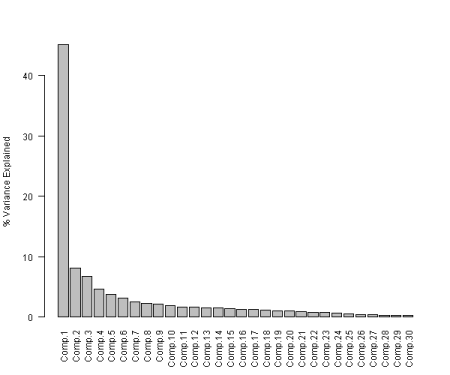
The first principal component, usually it is market returns, explains around 45% of variance during 2012.
Next let’s plot all companies loadings on the first and second principal components and highlight points according to the sector they belong.
	#*****************************************************************
	# 2-D Plot
	#******************************************************************
	x = loadings[,1]
	y = loadings[,2]
	z = loadings[,3]
	cols = as.double(sectors)

	# plot all companies loadings on the first and second principal components and highlight points according to the sector they belong
	plot(x, y, type='p', pch=20, col=cols, xlab='Comp.1', ylab='Comp.2')
	text(x, y, data$symbolnames, col=cols, cex=.8, pos=4)

	legend('topright', cex=.8,  legend = levels(sectors), fill = 1:nlevels(sectors), merge = F, bty = 'n')
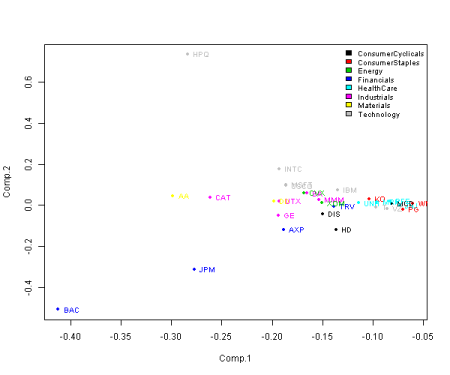
Please notice that the companies in the same sector tend to group together on the plot.
Next, let’s go one step further and create a 3D plot using first, second, and third principal components
	#*****************************************************************
	# 3-D Plot, for good examples of 3D plots
	# http://statmethods.wordpress.com/2012/01/30/getting-fancy-with-3-d-scatterplots/
	#******************************************************************
	load.packages('scatterplot3d')

	# plot all companies loadings on the first, second, and third principal components and highlight points according to the sector they belong
	s3d = scatterplot3d(x, y, z, xlab='Comp.1', ylab='Comp.2', zlab='Comp.3', color=cols, pch = 20)

	s3d.coords = s3d$xyz.convert(x, y, z)
	text(s3d.coords$x, s3d.coords$y, labels=data$symbolnames, col=cols, cex=.8, pos=4)

	legend('topleft', cex=.8,  legend = levels(sectors), fill = 1:nlevels(sectors), merge = F, bty = 'n')
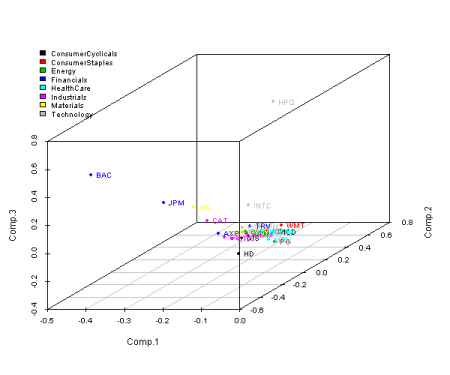
The 3D chart does add a bit of extra info, but I find the 2D chart easier to look at.
In the next post, I will demonstrate clustering based on the selected Principal components and after that I want to explore the interesting discussion presented in the using PCA for spread trading post.
Happy Holidays
To view the complete source code for this example, please have a look at the bt.pca.test() function in bt.test.r at github.


R-bloggers.com offers daily e-mail updates about R news and tutorials about learning R and many other topics. Click here if you're looking to post or find an R/data-science job.
Want to share your content on R-bloggers? click here if you have a blog, or here if you don't.