
4 lines of R to get you started using the Rook web server interface
Want to share your content on R-bloggers? click here if you have a blog, or here if you don't.
Now that Jeffrey Horner has settled on a name for his new package… the Rook web server interface is now available on CRAN.
Rook provides an interface for R programmers to build web applications which can run in R 2.13′s built-in web server or (soon) rApache.
Jeffrey’s provided some great documentation and sample code on his blog, in the README file, and in the package documentation itself, but somehow I completely missed the importance of the Rhttpd class and couldn’t figure out how to load or launch any of the examples.
Hopefully I can save someone some similar head-scratching. The key is the Rhttpd class, which controls the web server and manages applications. By default it will install the “RookTest” example, so here are 4 lines you need to see it work:
> library(Rook)
> s  s$start(quiet=TRUE)
> s$print()

Server started on 127.0.0.1:31839
[1] RookTest http://127.0.0.1:31839/custom/RookTest

Call browse() with an index number or name to run an application.
[EDIT: Thanks to Jim Porzak to pointing out that browse() is a method on the Rhttpd object rather than an old school package-scoped function. Times are a-changin’… for the better!]
The browse() function didn’t seem to work for me,s$browse(1) will load the URL into your browser or you can just copy-and-paste to access the running application:
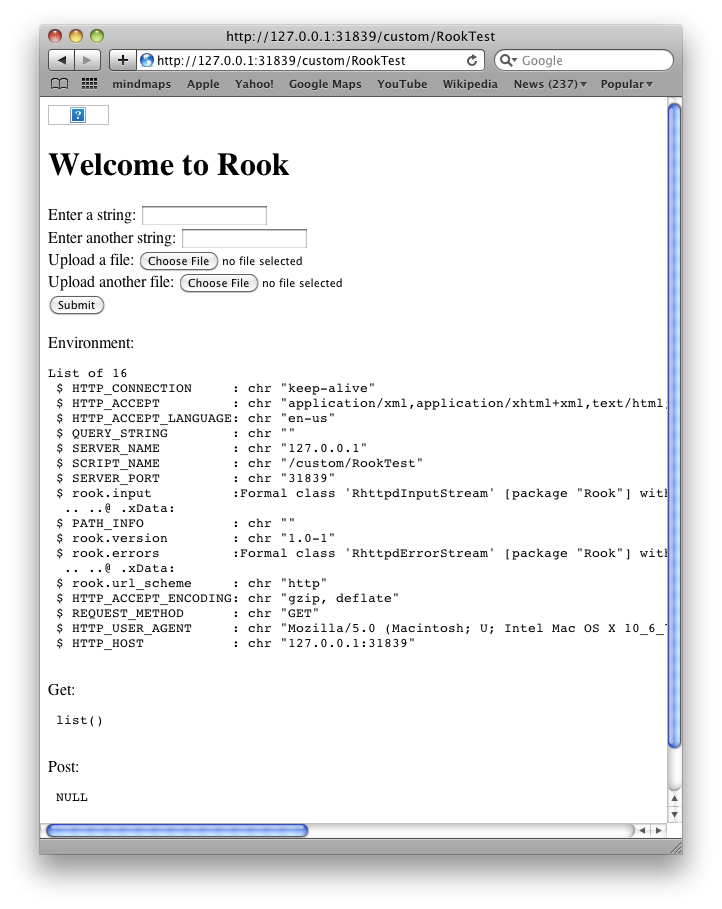
Enjoy!


R-bloggers.com offers daily e-mail updates about R news and tutorials about learning R and many other topics. Click here if you're looking to post or find an R/data-science job.
Want to share your content on R-bloggers? click here if you have a blog, or here if you don't.